 Amiga Hardware Database
Search Result
19 expansions found
Manufacturer Amitek, UK | Amiga any Amiga | Interface floppy port |
- Floppy Disk Drive
- external 3½" disk drive
- slim-line design
- supports DD floppy disks (formatted capacity 880KB)
- 'No Click&apos logic
- connects to DB23 floppy connector via fixed cable
- external DB23 bus connector for daisy-chaining additional floppy disk drives
- disable switch
- anti-virus function, selectable via switch (prevents write access to the bootblock on track 00)
- power supplied by the Amiga, no external power supply
- metal case
Manufacturer CEW Computer, Germany | Date 1988 | Amiga any Amiga | Interface floppy port |
- Floppy Disk Drive
- external 3½" disk drive
- slim-line design
- supports DD floppy disks (formatted capacity 880KB)
- connects to DB23 floppy connector via fixed cable
- external DB23 bus connector for daisy-chaining additional floppy disk drives
- disable switch
- power supplied by the Amiga, no external power supply
- metal case

Advert (DE)
1988-01
Manufacturer Elaborate Bytes, Germany | Date 1988 | Amiga A500, A1000A2000, A3000, A4000 | - - | Interface side expansion portZorro II |
- MFM controller
- consists of MFM (OMTI 5520-B) or RLL (OMTI 5527-B) controller and an adaptor card
- some MFM hard disks can be used with RLL controller, resulting in 50% higher capacity
- cannot autoboot - by making the driver reset resistent, rebooting off hard disk is possible
- supports FFS
- supports expanded Amigas with processor card and 32 bit RAM
- A-Max II driver (ALF.amhd)
- A500 and A1000 versions:
- both versions have different adaptor boards
- plugs into side expansion port - no passthrough connector
- no case (just the two naked boards)
- does not provide power to the hard disk - it needs its own power supply
- Zorro II version:
- is a half length card
- has no place for mounting a hard disk
- ALF-15.dms
install disk v1.5
323 kB - ALF-16.dms
install disk v1.6 (alf.device v1.614)
351 kB

Advert (DE)
1989-03
Manufacturer Elaborate Bytes / BSC, Germany | Date 1989 | Amiga A500, A1000A2000, A3000, A4000 | - - | Interface side expansion portZorro II | Autoconfig ID 2049 / 1,22092 / 2 |
- ST506/412 or SCSI controller
- A.L.F. 2 is a general hard disk driver software with 16 different hardware versions based on it
- supports processor cards and does some optimizations for the better processors
- handles drives up to 1 GB only
- Model 1:
- only ST506/412, either MFM or RLL
- cannot autoboot - by making the driver reset resistent, rebooting off hard disk is possible
- the Zorro II version is half length (only a Zorro - XT adaptor board), the metal hard disk mounting frame is optional
- Model 2:
- ST506/412 (either MFM or RLL) or SCSI
- autoboot ROM - autobooting requires at least Kickstart 1.3
- the Zorro II version is full length and has place for mounting a 3.5" hard disk
- if a Model 1 and a Model 2 controller are installed in one Amiga at once, the Model 2 controls the Model 1 (autobooting is possible on both controllers)
- the 16 versions of A.L.F. 2:
- A2000 MFM - Model 1 & 2
- A2000 RLL - Model 1 & 2
- A2000 SCSI - only Model 2
- A500 MFM (without casing) - only Model 1
- A500 MFM (with casing) - Model 1 & 2
- A500 RLL (without casing) - only Model 1
- A500 RLL (with casing) - Model 1 & 2
- A500 SCSI (with casing) - only Model 2
- A1000 MFM (without casing) - only Model 1
- A1000 MFM (with casing) - only Model 1
- A1000 RLL (without casing) - only Model 1
- A1000 RLL (with casing) - only Model 1
- the A500 and A1000 versions connect to the side expansion port
- those without case have no passthrough connector, the others have one
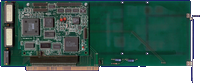
Elaborate Bytes A.L.F. 2 (OMTI), front side
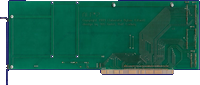
Elaborate Bytes A.L.F. 2 (OMTI), back side
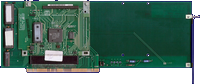
Elaborate Bytes ALF 222C (SCSI), front side
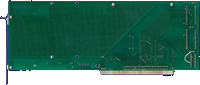
Elaborate Bytes ALF 222C (SCSI), back side
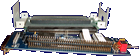
BSC A.L.F. 2 SCSI 500, left side
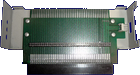
BSC A.L.F. 2 SCSI 500 passthrough board, front side
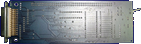
BSC A.L.F. 2 SCSI 500 controller card, back side
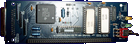
BSC A.L.F. 2 SCSI 500 controller card, front side
- ALF2-27.dms
install disk v2.7
362 kB - ALF2-Extras.dms
extras disk
264 kB - ALF2-MelMac.dms
A-Max driver
5 kB - ALF222C_MFM_Rev2.zip
firmware v2.0 for ALF222C MFM version (Module: FAB 0005763 REV A)
19 kB - ALF2_226c.dms
install disk v2.26c
377 kB
Advert (DE)
1989-08
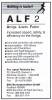
Advert (US)
1989-10
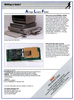
Advert (US)
1990-08
Manufacturer Elaborate Bytes / BSC, Germany | Date 1990 | Amiga A2000, A3000, A4000 | Interface Zorro II | Autoconfig ID 2046 / 32049 / 3 2092 / 3 |
- SCSI 2 controller
- NCR 53C94 @ 25 MHz
- does not use DMA but interrupt driven programmed I/O
- 50 pin internal SCSI connector
- DB25 external SCSI connector for both snap-in and screw-in connectors
- place for a 3.5" hard disk on the card
- autoboot ROM - autobooting requires at least Kickstart 1.3
- RDB compatible
- two-ROM version (ALF 232C)
- designed by Elaborate Bytes
- after developing this card, Elaborate Bytes sold their entire hardware product range to BSC
- jumper settings:
| Jumper | Configuration | Setting |
| J1 | Kickstart | ON - Kickstart 1.2, OFF - Kickstart >= 1.3 |
| J2 | Deactivation | Disable Controller |
| J3-J5 | SCSI ID | Set SCSI ID ON ON ON - 0 ON ON OFF - 1 ... OFF OFF OFF - 7 |
| J6 | Parity | ON - No Parity Check, OFF - Parity Check |
| J7 | LUN | ON - No LUN Control, OFF - LUN Control |
| J8 | Disconnect/Reconnect | ON - No Disconnect/Reconnect allowed, OFF - Disconnect/Reconnect allowed |
| J9, J10 | Login Screen | ON ON - Login Screen disabled ON OFF - Login Screen by pressing F1 OFF ON - Login Screen after every reset OFF OFF - Login Screen when no password is set (power up) or by pressing F1 |
| J11 | Interrupt | ON - INT2, OFF - INT6 |
| J12 | Reset Level | ON - Delete all control registers upon reset (test purposes) |
| J13 | Bus Termination | ON - 5V on Termination Power Line |
- one-ROM version (Oktagon 2000)
- designed by BSC
- an Oktagon 2008 without RAM expansion
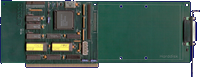
Elaborate Bytes ALF 232C, front side
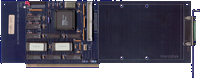
BSC A.L.F. 3, front side
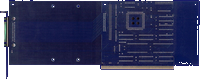
BSC A.L.F. 3, back side
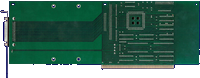
Elaborate Bytes ALF 232C, back side
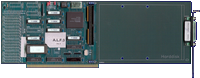
BSC A.L.F. 3 (Oktagon 2000), front side
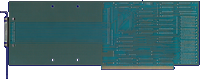
BSC A.L.F. 3 (Oktagon 2000), back side
- oktapus.lha
Aminet
OktaPussy v2.1 (24.11.98)
106 kB
Advert (DE)
1990-11
Advert (DE)
1991-03
Manufacturer Alfa Data, Taiwan | Date 1994 | Amiga any Amiga | Interface parallel port |
- No description available.
Do you own this expansion, or have information about it? Please let us know.

Advert (US)
1994-01
Advert (NL)
1994-01
Manufacturer Alfa Data, Taiwan / BSC, Germany | Date 1992 | Amiga A500 | Interface side expansion port | Autoconfig ID 2092 / 6,8 |
- IDE controller
- uses polled I/O, not DMA transfer
- RDB compatible
- 40 and 44 pin internal IDE headers
- place for a 3.5" hard disk inside the case
- uses the same autoboot ROMs as the BSC AT-Bus 508 / 2008
- can use the same partitioning software as the AT-Bus series (HDInstTools)
- memory
- sixteen ZIP sockets accept 8 MB RAM
- supports either static column or page mode ZIPs
- accepts ZIPs in groups of four giving 2, 4, 6 or 8 MB configurations
- notes
- connects to the side expansion port, no passthrough connector
- RAM and HD can be disabled by switches on the top of the case
- connector for the optional external power supply, though it can use power from the A500
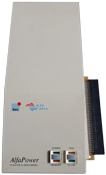
front side

PCB, front side

PCB, back side
- BSC-HD.pdf
Controller Hardware and Software Installation Manual (english/german)
443 kB
- AlfaPower-24.dms
install disk (HDInstTools v2.4)
227 kB - AlfaPower_AT-Bus_ROM-610.zip
ROM v6.10
13 kB - oktapus.lha
Aminet
OktaPussy v2.1 (24.11.98)
106 kB

Advert (US)
1993-04
Manufacturer Alfa Data, Taiwan / BSC, Germany | Date 1993 | Amiga A500 | Interface side expansion port | Autoconfig ID 2092 / 6,8,38 |
- IDE controller
- uses polled I/O, not DMA transfer
- RDB compatible
- 40 and 44 pin internal IDE headers
- place for a 3.5" hard disk inside the case
- uses the same autoboot ROMs as the BSC AT-Bus 508 / 2008
- can use the same partitioning software as the AT-Bus series (HDInstTools)
- memory
- two SIMM sockets accept up to 8 MB RAM
- supports 2, 4, 6 or 8 MB configurations
- notes
- connects to the side expansion port, no passthrough connector
- RAM and HD can be disabled by switch on the back of the case
- connector for the optional external power supply, though it can use power from the A500
- AlfaPower-24.dms
install disk (HDInstTools v2.4)
227 kB - AlfaPowerPlus_ROM-83.zip
ROM v8.3 (incompatible with AlfaPower / AT-Bus with ZIP-RAM)
10 kB - oktapus.lha
Aminet
OktaPussy v2.1 (24.11.98)
106 kB
Manufacturer Alfa Data, Taiwan | Date 1993 | Amiga A2000, A3000, A4000 | Interface Zorro II | Autoconfig ID 2092 / 8 |
- sixteen ZIP sockets accept 8 MB RAM
- supports 1M×4 ZIPs
- accepts ZIPs in groups of four giving 2, 4, 6 or 8 MB configurations
- disable jumper
- half length card

front side

back side

Advert (US)
1992-06

Advert (US)
1992-08
Manufacturer Alfa Data, Taiwan | Date 1991 | Amiga A500 | Interface trapdoor slot, Gary socket |
- 16 DIP sockets accept up to 2 MB RAM
- accepts 256k×4, 100 ns or faster DIPs in groups of four
- 1 MB can be set either as Chip or Fast RAM
- the main board connects to the trapdoor slot
- an adaptor board connects to Gary's socket
- battery backed up clock

front side

back side

Advert (US)
1991-12
Advert (US)
1992-06
Manufacturer Alfa Data, Taiwan | Date 1991 | Amiga A500 | Interface trapdoor slot, Gary socket |
- 32 DIP sockets accept up to 4 MB RAM
- accepts 256k×4, 100 ns or faster DIPs in groups of four giving 0.5 to 4 MB configurations in 512kB increments
- the main board connects to the trapdoor slot
- an adaptor board connects to Gary's socket
- battery backed up clock
- disable switch, connected to jumper JP2 on the board
- AlfaRam_RA5-4M.pdf
User Manual (english/german)
8.0 MB
Manufacturer Alfa Data, Taiwan | Amiga A500 | Interface trapdoor slot |
- 512 kB RAM
- four socketed 256k×4, 120 ns DIPs
- connects to the trapdoor slot
- battery backed up clock
- disable jumper

front side

back side
Advert (US)
1991-12
Manufacturer Alfa Data, Taiwan | Date 1992 | Amiga A500, A500+ | Interface trapdoor slot |
- RA5-512K+ for the A500
- 512 kB RAM
- four socketed 256k×4 DIPs
- battery backed up clock
- RA5-1M+ for the A500+
- 1 MB RAM
- eight socketed 256k×4 DIPs
- both cards use the same PCB
- connects to the trapdoor slot
- disable jumper

front side

back side
Manufacturer Alfa Data, Taiwan | Date 1993 | Amiga A500 | Interface side expansion port | Autoconfig ID 2076 / 24 |
- sixteen ZIP sockets accept up to 8 MB RAM
- supports 1M×4 ZIPs, 100 ns or faster
- accepts ZIPs in groups of four, giving 2, 4, 6 or 8 MB configurations
- memory autoconfiguration
- disable switch on top of the case
- connects to the side expansion port
- passthrough connector
- incompatible with the A570 CD-ROM drive connected to the passthrough connector - disabling the AlfaRAM's memory gets the A570 to work

front side

Case opened, top side

Case, top side

back side
- AlfaRAM500.dms
two RAM test programs
22 kB
Manufacturer Alfa Data, Taiwan | Date 1993 | Amiga A600 | Interface trapdoor slot |
- 1 MB Chip RAM
- eight 256k×4 DIPs
- fits into the trapdoor slot
- battery backed-up clock
- disable jumper
Manufacturer Alfa Data, Taiwan | Date 1993 | Amiga any Amiga | Interface parallel port |
- Handy Scanner
- scans monochrome and grey shades
- AlfaScan / AlfaScan-A: supports 128 gray shades
- AlfaScan-Plus: supports 256 gray shades
- 400 dpi optical resolution
- 105 mm scan width
- status LED
- buzzer to indicate over speed during scanning
- scan start button
- controls: contrast, resolution (100/200/300/400 dpi), dithering/bit depth (1 text and 3 photo settings)
- supplied scale to support scanning larger pages ("AlfaScale")
- Scanner Interface HSC-M-B
- connects to the parallel port via short ribbon cable
- for use with A1000, an adaptor is needed
- 8 pin Mini-DIN connector for scanner
- no passthrough connector
- external power supply
Advert (US)
1991-12

Advert (US)
1992-12

Advert (US)
1993-02
Advert (US)
1993-04
Manufacturer Alfa Data, Taiwan | Date 1991 | Amiga any Amiga | Interface floppy port |
- Floppy Disk Drive
- external 3½" disk drive
- slim-line design
- supports DD floppy disks (formatted capacity 880KB)
- connects to DB23 floppy connector via fixed cable
- external DB23 bus connector for daisy-chaining additional floppy disk drives
- disable switch
- power supplied by the Amiga, no external power supply
- metal case
Manufacturer BSC, Germany / Alfa Data, Taiwan | Date 1993 | Amiga A1200 | Interface trapdoor slot | Autoconfig ID 2092 / 7 |
- Memory Expansion
- 1 MB RAM soldered to the back of the card (can be disabled with a jumper)
- 16 ZIP socket for up to 8 MB RAM
- accepts 1M×4, Static Column or Page Mode, 80 ns or faster ZIPs in groups of eight
- possible configurations are 1, 4, 5, 8 and 9 MB RAM
- with 8 or 9 MB RAM installed, the memory address space can be set either continuous or PCMCIA compatible
- for 4 MB, ZIPs have to be installed in U3x sockets
- optional PLCC FPU, can be clocked either synchronously (14.28 MHz) or asynchronously (up to 50 MHz)
- battery backed up real time clock
- disable jumper
- test mode jumper (prevents the RAM to be used by the OS - for RAM testing purposes)
- jumper settings
| Jumper | Configuration | Setting |
| J1 | Real-Time Clock | UP - RTC deactivated, DOWN - RTC active |
| J2 | PCMCIA | UP - PCMCIA usable, DOWN - PCMCIA not usable |
| J3 | Deactivate RAM | UP - RAM activated, DOWN - RAM deactivated |
| J4 | 1 MB RAM Setting | UP - 1MB RAM activated, DOWN - deactivated |
| J5 | RAM Size | UP - 4MB RAM installed, DOWN - 8MB RAM installed |
| J6 | RAM Test Mode | UP - Test Mode activated, DOWN - normal operation |
| J7 | FPU | LEFT - asynchronous operation (FPU installed), RIGHT - synchronous operation |


Manufacturer Logica, Italy | Date 1992 | Amiga A500 | Interface trapdoor slot |
- Memory Expansion
- 512 kB RAM ('RangerRAM', slow FastRAM)
- four 256k×4 DIP chips
- connects to the trapdoor slot (internal expansion)
- no battery backed up clock
- uses the same PCB as the Logica Micro Mega RAM expansion

front side

back side