 Amiga Hardware Database
Manufacturer “Spirit Technology”
14 expansions in database
Manufacturer Spirit Technology, USA | Date 1990 | Amiga A500, A1000 | Interface side expansion port | Autoconfig ID 2034 / 5 |
- 6× empty ISA slots
- 1× empty Zorro II slot for the OctaByte 8 MB memory card
- contains an AX-S 2000 bridgeboard (AX-S Interpreter)
- allows using of inexpensive 8 and 16 bit ISA cards with the Amiga
- supplied with basic drivers for hard drive controller and A/D converter cards
- the user has to write his own drivers for his other ISA cards with the help of the included AX-S Resource Library and sample driver source code
- 3× 5.25" drive bays
- 200W power supply
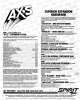
Advert (US)
1989-12
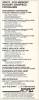
Advert (US)
1990-03
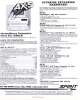
Advert (US)
1990-03
Manufacturer Spirit Technology, USA | Date 1990 | Amiga A2000, A3000, A4000 | Interface Zorro II, ISA | Autoconfig ID 2034 / 5 |
- allows the use of inexpensive 8 and 16 bit ISA cards in the Amiga
- supplied with basic drivers for hard drive controller and A/D converter cards
- the user has to write his own drivers for his other ISA cards with the help of the included AX-S Resource Library and sample driver source code
Manufacturer Spirit Technology, USA | Date 1990 | Amiga A500 | Interface trapdoor slot, CPU slot |
- Memory Expansion
- provides up to 3.5 MByte FastRAM and 512 kByte ChipRAM
- memory board provides 32 DIP sockets
- supports 256k×4 (414256), <150 ns DIPs
- accepts DIPs in groups of four giving 0.5, 1, 1.5, 2, 2.5, 3, 3.5, 4 MB configurations
- when installing RAM, the chips have to be installed starting from bank 1 up to bank 8 - the specific sockets (U3 - U34) for each bank are mentioned in the manual
- supports Fat Agnus and Fatter Agnus (ECS Agnus) - each needs a specific PAL chip in socket U3 on the CPU board ('468' marking - Fat Agnus, '4468' marking - Fatter Agnus)
- only 1.5 MB or 2 MB RAM is autoconfigured (depending on Agnus revision), the remaining memory needs to be added via AddTrap utility
- compatible with Kickstart 1.2, here only 512 kByte ChipRAM is autoconfigured (bank 1) - as with Kickstart ≥1.3, the remaining memory needs to be added via AddTrap utility
- no disable switch
- battery backed up clock
- solderless installation
- the memory board connects to the trapdoor slot
- the adapter board connects to 68000 CPU socket, the CPU is replaced onto the board
- both boards are interconnected with a 38cm ribbon cable, allowing upgrading the RAM board without dissassembly of the Amiga
- current consumption <400mA
- Memory Board Switch Settings
| Switch | Setting |
| 1 | ON - enables specific memory banks for Fat Agnus (banks 4 - 8) and Fatter Agnus (banks 5 - 8) OFF - no memory installed |
| 2 | ON - enables specific memory banks for Fat Agnus (banks 1 - 3) and Fatter Agnus (banks 2 - 4) OFF - no memory installed |
| 3 | ON - Kickstart 1.3 OFF - Kickstart 1.2 |
| 4 | not used |
| 5 | ON - Fat Agnus OFF - Fatter Agnus (ECS Agnus) |
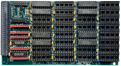
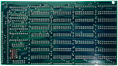
Memory board, front side
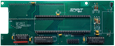
Memory board, back side
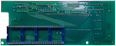
CPU adapter, front side
CPU adapter, back side
- FatTrapper.pdf
User Manual
5.7 MB
- FatTrapper-10.dms
Software Support Disk v1.0
AddTrap v1.1
385 kB
Advert (SE)
1990-04
Advert (US)
1990-11
Advert (US)
1990-12
Manufacturer Spirit Technology, USA | Date 1988 | Amiga A500, A1000 | Interface side expansion port | Autoconfig ID 2034 / 4 |
- OMTI Controller
- external hard disk solution for A500 and A1000
- consists of two parts: an interface module which plugs into the side expansion port, and the hard disk housing which is connected via multiple cables fed through the back side of the interface module
- A1000/A500 Interface Module
- serves as a host for a 62 pin ST412/506 controller card
- compatible controllers:
- OMTI 5520 (MFM)
- OMTI 5527 (RLL)
- DTC-5150 X (MFM)
- DTC-5160 CRH (RLL)
- supports RLL and MFM, depending on controller card
- works only with hard disks with OMTI or DTC controller
- features a passthrough connector for the side expansion port
- optional autoboot daughterboard (stdisk.device in ROM)
- cannot load data into the RAM of 32 bit accelerators
- if used together with a Spirit Inboard, the RAM has to be set to not autoconfig in order to avoid boot problems
- the interface module is designed for the A1000 - to use it with the A500, an adapter PCB is needed
- A500 Interface Module
- later released A500 specific variant with same electronics
- does not fit the A1000
- mounting space for a 3½" hard disk inside the module, but can also be used with the additional hard disk module
- Hard disk module
- mounting space for a 5¼" hard disk
- integrated power supply, powers both hard disk and the interface
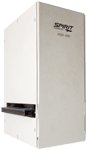
front side
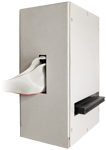
back side
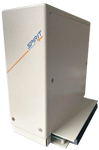
A500 Intf. Module, front side

Interface Card, front side

Interface Card, back side

Bus adapter, front side

Bus adapter, back side

A500 Adapter, front side
- HDA506.pdf
User Manual
7.2 MB
- HDA506-20.dms
support disk v2.0
335 kB
Advert (US)
1989-07
Advert (US)
1989-12
Advert (US)
1990-03
Advert (US)
1990-03
Manufacturer Spirit Technology, USA | Date 1987 | Amiga A1000 | Interface 68000 socket | Autoconfig ID 2034 / 1 |
- FastRAM expansion
- 48 DIP sockets accept up to 1.5 MB RAM
- supports 256k×1 DIPs, 120 - 150 ns
- accepts DIPs in groups of 16 giving 0.5, 1 or 1.5 MB configurations
- banks have to be filled beginning from bank 0
- connects into the 68000 socket
- the 68000 is replaced onto the board
- battery backed-up clock
- two clips have to be connected to the DPALEN (A1000 NTSC version) resp. PALEN (international version) PAL chip to provide the OVR* and *XRDY signals to the expansion
- does not really autoconfig its memory - it recognizes the installed amount, but places the memory outside of the autoconfig space
- Jumper Settings
- JP1-JP3 OFF: 1.5 MB with Autoconfig (banks 012)
- JP1-JP2 OFF, JP3 ON: 1.0 MB with Autoconfig (banks 01)
- JP1 OFF, JP2-JP3 ON: 0.5 MB with Autoconfig (bank 0)
- JP1-JP3 ON: no Autoconfig (memory has to be added with AddMem)
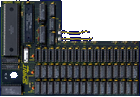
front side
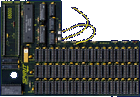
front side
- Inboard1000.pdf
installation instructions (PDF)
8.5 MB - Inboard1000.txt
installation instructions (text format)
28 kB - Inboard1000_Diagrams.pdf
diagram sheet
1989 kB - SpiritTechnology-Brochure.pdf
Spirit Technology Brochure
530 kB
- Inboard1000-10-8710.dms
install disk v1.0 including manual (10/1987)
241 kB - Inboard1000-10-8801.dms
install disk v1.0 including manual (01/1988)
312 kB - Inboard1000-10.dms
install disk v1.0 including manual (06/1988)
242 kB - Inboard1000-20.dms
install disk v2.0 (10/1989)
357 kB - spiritinsider.dms
Installer's Heaven
install disk
311 kB
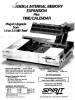
Advert (US)
1987-04
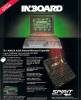
Advert (US)
1987-11
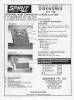
Advert (AU)
1988-01
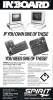
Advert (US)
1988-03
Advert (FR)
1988-05
Advert (US)
1988-06
Advert (FR)
1988-11
Advert (US)
1989-05
Advert (US)
1989-12
Advert (US)
1990-03
Advert (US)
1990-03
Advert (US)
1990-12
Manufacturer Spirit Technology, USA | Date 1987 | Amiga A500 | Interface 68000 socket | Autoconfig ID 2034 / 2 |
- 48 DIP sockets accept up to 1.5 MB RAM
- supports 256k×1 DIPs only
- accepts DIPs in groups of 16 giving 0.5, 1 or 1.5 MB configurations
- does not really autoconfig its memory - it recognizes the installed amount, but places the memory outside of the autoconfig space
- the Inboard may use up about 200 kB of RAM for some custom PAL chips:
- an 512 kB Inboard and an A501 (or compatible) nets 1.5 MB
- an 1 MB Inboard without the A501 nets 1.5 MB
- an 1 MB Inboard and an A501 results about 1.8 MB total
- an 1.5 MB Inboard gives also 1.8 MB only
- by turning off the automatic memory recognition and using the AddMem software, the 200 kB loss can be eliminated
- connects into the 68000 socket
- the 68000 is replaced onto the board
- a clip has to be attached to the Gary chip
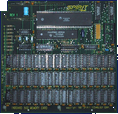
front side
- SpiritTechnology-Brochure.pdf
Spirit Technology Brochure
530 kB
Advert (US)
1987-11
Advert (AU)
1988-01
Advert (US)
1988-03
Advert (FR)
1988-05
Advert (US)
1988-06
Advert (FR)
1988-11
Advert (US)
1989-12
Advert (US)
1990-03
Manufacturer Spirit Technology, USA | Date 1990 | Amiga A500, A2000 | Interface 68000 socket | Autoconfig ID 2034 / 8 |
- processor
- the board has its own CMOS 68000 processor installed
- socket for an optional 68881 or 68882 PGA FPU
- connects into the 68000 socket
- SCSI controller
- Adaptec AIC6250 controller IC
- does not use DMA transfers
- supports the RDB standard
- autoboot ROM
- 50 pin internal SCSI header
- memory
- sixteen ZIP sockets accept up to 8 MB zero wait state RAM
- accepts 256k×4 or 1M×4 ZIPs in groups of eight
- supports 1, 2, 4 and 8 MB configurations
- InMate-10B.dms
Support Disk v1.0 Revision B
inmate.device v1.0 (29.11.1990), HD_Config v1.0
377 kB - InMate-12.BIN
U14 ROM Image v1.2
32 kB
Advert (US)
1990-12
Advert (US)
1991-01
Advert (US)
1991-04
Manufacturer Spirit Technology, USA | Date 1990 | Amiga any Amiga | Interface RGB port |
- genlock
- looping composite input (2× BNC)
- composite outputs (2× BNC)
- RGB output (3× BNC)
- key output (1× BNC)
- NTSC and PAL versions
- overlay fader with control selector
- genlock disable switch (Amiga passthrough)
- front panel can be remoted to 25 feet
- horizontal phase adjustable to source video
- selector for A500, A1000 and A2000 compliance
- SpiritTechnology-Brochure.pdf
Spirit Technology Brochure
530 kB
Advert (US)
1989-12
Advert (US)
1990-03
Advert (US)
1990-03
Advert (US)
1990-06
Advert (US)
1990-12
Advert (US)
1991-01
Manufacturer Spirit Technology, USA | Date 1989 | Amiga any Amiga | Interface serial port |
- MIDI Interface
- offers 2× MIDI In and 6× MIDI Out/Off/Through
- each port with switch control and status LED
- two separate selectable operational modes
- Mode 1: Any In to 6 Out/Off/Through
- Mode 2: First In to 3 Out/Off/Through, Second In to 3 Out/Off/Through
- connects to the Amiga via the serial port with pass-through
- separate inputs for A1000 and A500/A2000 - a switch is used to select the input/passthrough
- metal chassis
- external 9VAC/1.25A power supply
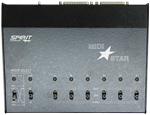
top side
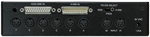
back side
- SpiritTechnology-Brochure.pdf
Spirit Technology Brochure
530 kB

Advert (US)
1988-11
Advert (US)
1989-12
Advert (US)
1990-03
Advert (US)
1990-03
Manufacturer Spirit Technology, USA | Date 1990 | Amiga A2000, A3000, A4000 | Interface Zorro II | Autoconfig ID 2034 / 6 |
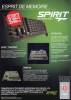
- Memory Expansion
- RAM expansion card for the Zorro II bus
- provides up to 8 MB FastRAM
- 64 DIP sockets
- supports 2, 4, 6 or 8 MB configurations
- accepts 1M×1 DIPs, 150 ns or faster

front side

back side
- SpiritTechnology-Brochure.pdf
Spirit Technology Brochure
530 kB
- Octabyte-10.dms
Software Support Disk v1.0
28 kB
Advert (US)
1989-12
Advert (US)
1990-03
Advert (US)
1990-03
Advert (FR)
1990-07
Advert (FR)
1990-08
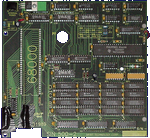
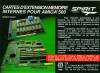
Manufacturer Spirit Technology, USA | Date 1988 | Amiga A500 | Interface 68000 socket | Autoconfig ID 2034 / 38244 / 3 |
- sixteen DIP sockets accept up to 2 MB RAM
- supports 256k×4 DIPs only
- supports 0.5, 1 and 2 MB configurations
- connects into the 68000 socket, the 68000 is replaced onto the board
- optional external power source
front side
- SIN500-2.pdf
user manual
40 kB - SpiritTechnology-Brochure.pdf
Spirit Technology Brochure
530 kB
- SIN500-2.dms
Utilites Disk including manual
156 kB
Advert (US)
1988-11
Advert (US)
1989-05
Advert (FR)
1989-11
Advert (US)
1990-03
Advert (FR)
1990-07
Advert (FR)
1990-08
Manufacturer Spirit Technology, USA | Date 1988 | Amiga A2000 | Interface Zorro II | Autoconfig ID 2034 / 4 |
- OMTI controller
- serves as a host for a 62 pin OMTI5520 (ST412/506) controller card
- supports RLL and MFM
- works only with hard disks with OMTI or DTC controller
- autoboot ROM - autobooting requires Kickstart 1.3
- metal rail for a 3.5" drive
- cannot load data into the RAM of 32 bit accelerators
- SpiritTechnology-Brochure.pdf
Spirit Technology Brochure
530 kB
Advert (US)
1989-12
Advert (US)
1990-03
Manufacturer Spirit Technology, USA | Date 1989 | Amiga A500 | Interface trapdoor slot |
- 512 kB RAM
- available with sixteen sockets for 256k×1 DIPs or with four sockets for 256k×4 DIPs
- connects to the trapdoor slot
- battery backed up clock
- disable switch
- SpiritTechnology-Brochure.pdf
Spirit Technology Brochure
530 kB
Advert (FR)
1989-11
Advert (US)
1989-12
Advert (US)
1990-03
Advert (US)
1990-03
Advert (FR)
1990-07
Advert (FR)
1990-08
Manufacturer Spirit Technology, USA | Date 1990 | Amiga A500, A1000 | Interface side expansion port | Autoconfig ID 2034 / 6 |
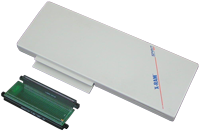
- Memory Expansion / Expansion Chassis
- an expansion chassis containing a standard Spirit Octabyte Zorro II card
- provides up to 8 MB FastRAM
- 64 DIP sockets
- supports 2, 4, 6 or 8 MB configurations
- accepts 1M×1 DIPs, 150 ns or faster
- connects to the side expansion port
- external power supply
- Notes
- for the A1000, a (supplied) adapter PCB is needed to fit the expansion
w A1000 Adapter, front side
- SpiritTechnology-Brochure.pdf
Spirit Technology Brochure
530 kB
- Octabyte-10.dms
Software Support Disk v1.0
28 kB
Advert (US)
1990-03
Advert (US)
1990-03
Advert (US)
1991-04