 Amiga Hardware Database
Manufacturer “ECR Elettronica”
11 expansions in database
Manufacturer ECR Elettronica, Italy | Date 1991 | Amiga A500 | Interface trapdoor slot |
- No description available.
Do you own this expansion, or have information about it? Please let us know.
Advert (IT)
1990-11
Advert (IT)
1991-09
Manufacturer ECR Elettronica, Italy | Date 1991 | Amiga A500 | Interface side expansion port |
- No description available.
Do you own this expansion, or have information about it? Please let us know.
Advert (IT)
1991-09
Manufacturer ECR Elettronica, Italy | Date 1990 | Amiga A500 | Interface trapdoor slot |
- No description available.
Do you own this expansion, or have information about it? Please let us know.
Advert (IT)
1991-09
Manufacturer ECR Elettronica, Italy | Date 1989 | Amiga any Amiga | Interface parallel port, RGB port |
- Framegrabber
- real-time framegrabber, digitizes one field of an interlaced frame in 20 ms
- internal RGB splitter
- colors are digitized with 4 bit per color, resulting in 4096 colors in total
- supports full overscan resolution (704×576 pixels)
- brightness, contrast and saturation controls at the front panel
- LED digitization indicator at the front panel
- connects to parallel port, no passthrough
- video input connectors: 1× 23 pin RGB, 1× RCA composite video
- 23 pin RGB monitor output, displays Amiga or video image
- switches at the front panel to select video and RGB monitor output
- supplied with VDController software by Serafin Software
- provides "Fast" and "Quality" mode - the latter provides a better color fidelity by using 8 bits per color, which result in 16 or 32 color images that provide a good representation of a 4096 HAM color image
- Red/Green/Blue + Yellow/Magenta/Cyan vectorscope with color control
- color processor provides:
- color gradation curves - linear curve, logarithmic curve, S-curve + inversion modes
- blur and sharpening filters
- saturation control
- image average (up to 4 images) to reduce noise
- timer function provides 0.1 - 25.5 sec intervals to capture one or several images
- 3D image support (to be viewed with 3D LCD goggles)
- preview mode which reduces the control elements and focuses on the video image
- full keyboard controls
- metal enclosure, size 32×11×24 cm
- internal power supply
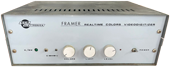
front side
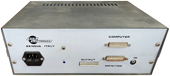
back side
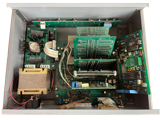
open, dislocated PCB, top side
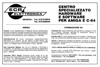
Advert (IT)
1990-02
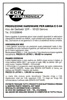
Advert (IT)
1990-10
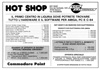
Advert (IT)
1990-12

Advert (DE)
1991-04
Manufacturer ECR Elettronica, Italy | Date 1991 | Amiga any Amiga | Interface serial port |
- MIDI Interface
- offers 1× MIDI-In, 3× MIDI-Out and 1× MIDI-Through
- connects to the Amiga via the serial port
- no pass-through connector
- rather large metal chassis which matches the Overtop Sampler
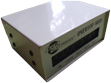
front side

front side

back side
Advert (IT)
1991-09
Manufacturer ECR Elettronica, Italy | Date 1990 | Amiga any Amiga | Interface parallel port |
- Sound Sampler
- 8 bit stereo audio digitizer
- 3.5mm stereo jack audio input for microphone signals
- 2× RCA jack for line level input signals
- gain potentiometer at front panel
- connects to the Amiga via the parallel port
- built-in mains power supply, doesn't draw power from the Amiga
- supplied without software - compatible with e.g. AudioMaster III and Audion 4 sampling programs

front side

back side
Advert (IT)
1990-12
Manufacturer ECR Elettronica, Italy | Date 1992 | Amiga any Amiga | Interface parallel port |
- Teletext Decoder
- view and save Teletext pages
- save format: custom format, ASCII text or IFF image
- previously saved files can be loaded and viewed with the control software
- TV signal input as composite video via DIN socket or Cinch input connector
- connects to the Amiga via the parallel port, with passthrough connector
- direct print option as ASCII or image format
- supports teletext subpages
- provides 'stop' command to stop the cycling of subpages and 'help' command to uncover hidden text
- software caches received pages
- internal 230V power supply
- on/off switch at the front plate
Advert (IT)
1991-09
Manufacturer ECR Elettronica, Italy | Date 1990 | Amiga any Amiga | Interface parallel port |
- Teletext Decoder
- view and save Teletext pages
- save format: custom format, ASCII text or IFF image
- previously saved files can be loaded and viewed with the control software
- TV signal input as composite video via DIN socket or Cinch input connector
- connects to the Amiga via the parallel port, no passthrough
- direct print option as ASCII or image format
- with the lack of passthrough connector, a direct print to a parallel port printer without additional hardware is not possible - the successor product T-Dec solves this problem by providing a parallel port passthrough
- supports teletext subpages
- provides 'stop' command to stop the cycling of subpages and 'help' command to uncover hidden text
- software caches received pages
- internal 230V power supply
- on/off switch at the front plate
Advert (IT)
1990-02
Advert (IT)
1990-12
Manufacturer ECR Elettronica, Italy | Date 1990 | Amiga A2000 | Interface video slot |
- No description available.
Do you own this expansion, or have information about it? Please let us know.
Advert (IT)
1990-11
Advert (IT)
1990-12
Manufacturer ECR Elettronica, Italy | Date 1990 | Amiga any Amiga | Interface RGB port |
- Genlock
- Genlock based on Motorola 1378P chip
- aimed at hobbyists and video amateurs
- input connectors: 1× RCA Composite Video In, 1× 23 pin RGB Amiga Video Input
- output connectors: 1× RCA Composite Video Out, 1× 23 pin RGB Monitor Output
- on/off button at the back side to enable the composite video connectors and genlock function - when off, the Amiga video signal still is passed-through to the monitor port
- 1 Vpp composite video signal on 75 ohms for both input and output
- bandwidth of 6 MHz +/- 3 db
- three-way switch at the front plate selects the Genlock function: only computer signal, only the composite input video signal, or both signals mixed together at the output
- fader knob at the front panel to control the level of Amiga signal
- power is supplied by Amiga
- sturdy metal box, size: 18 × 4 × 15 cm
- Videogenlock MK2+
- the updated 'Plus' version was only changed slightly in comparison to MK II
- changes:
- changes in the circuit for superimposing the computer signal onto the video signal
- addition of a filter
- the signal has been boosted to allow the use of longer cables
- the functions on the 3-way switch have been changed to Super Impose function (controlled by fader), only the composite input video signal, and overlay of video signal and Amiga graphics
Advert (IT)
1990-02
Advert (IT)
1990-10
Advert (IT)
1990-12
Manufacturer ECR Elettronica, Italy | Date 1991 | Amiga any Amiga | Interface RGB port |
- No description available.
Do you own this expansion, or have information about it? Please let us know.
Advert (IT)
1991-09