 Amiga Hardware Database
Manufacturer “Vortex Computersysteme”
7 expansions in database
Manufacturer Vortex Computersysteme, Germany | Date 1990 | Amiga A2000, A3000, A4000 | Interface Zorro II | Autoconfig ID 8215 / 3 |
- IDE Controller
- 40 pin internal IDE connector
- autoboot ROM (vortex.device) - autoboots even under Kickstart 1.2
- not RDB compatible
- Filecard, place for a 3.5" hard disk on the card
- connector for HDD LED (Connector D)
- Memory
- provides up to 4 MB FastRAM
- four 30 pin SIMM sockets accept 2 or 4 MB RAM
- supports 1 MB SIMMs, 100 ns or faster
- memory autoconfiguration
- Jumper Settings
| SW1 | ||
| 1 2 | ON OFF | 4 MB RAM (U1 - U14) |
| 1 2 | OFF ON | 2 MB RAM (U11, U12) |
| 1 2 | OFF OFF | 0 MB RAM |
| 3 | OFF ON | Kickstart 1.2 Kickstart ≥1.3 |
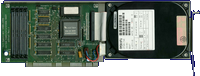
front side
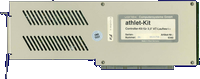
back side
- Vortex_StorageSystems.pdf
Bedienungsanleitung / User Manual (german)
9.2 MB - Vortex_StorageSystems-en.pdf
User Manual
718 kB
- Vortex_HDInstall-103.dms
HDD Install disk
vortex.device v1.03
286 kB - Vortex_WB.dms
WB disk
356 kB
Advert (DE)
1990-05
Manufacturer Vortex Computersysteme, Germany | Date 1990 | Amiga A500A2000 | - - | Interface 68000 socketZorro II |
- IBM AT emulation
- 80286 @ 7.2 MHz
- plugs into 68000 socket - the board contains a 68000 already
- installing into an A2000 requires an adaptor card which plugs into the CPU slot and a software version ≥ v1.10
- no RAM on board, it uses the Amiga RAM
- video emulation
- CGA (non-interlaced)
- Hercules (720*348 interlaced) - too wide, scrolls horizontally
- T3100 (640*400 interlaced)
- Olivetti (640*400 interlaced)
- supports virtual drives (PC hardfiles on Amiga hard disk)
- uses Amiga floppy drives
- uses Amiga serial and parallel ports
- the Amiga mouse is emulated as Microsoft compatible mouse

Rev 1, front side

Rev 1, back side

Rev 2, front side

Rev 2, back side
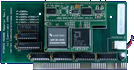
Rev2 on A2000 adaptor, front side
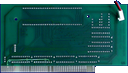
Rev2 on A2000 adaptor, back side
- ATOnce-105.dms
system disk v1.05
262 kB - ATOnce-127.dms
system disk v1.27
283 kB - ATOnce-300.dms
system disk v3.00
296 kB - ATOnce-DosUtilities.lha
DOS Utilities
1 kB - atonce-sys.dms
Installer's Heaven
install disk
287 kB
Advert (US)
1990-12
Advert (DE)
1990-12
Advert (DE)
1991-05
Advert (US)
1991-09
Advert (DE)
1992-04
Manufacturer Vortex Computersysteme, Germany | Date 1991 | Amiga A500, A2000 | Interface 68000 socket |
- IBM AT emulation
- N80C286 @ 16 MHz
- optional P80C287 FPU
- plugs into 68000 socket - the 68000 is replaced onto the board
- a special double socket has to be put under the Gary chip
- 512 kB RAM on board, can use Amiga RAM if needed
- Amiga Fast RAM can be used as extended memory up to 8 MB
- video emulation
- CGA mode 0 (40*25, 16 colours)
- CGA mode 1 (40*25, 16 colours)
- CGA mode 2 (40*25, 16 colours)
- CGA mode 3 (80*25, 16 colours)
- CGA mode 4/5 (320*200, 4 colours)
- CGA mode 6 (640*200, 2 colours)
- MDA (80*25, 2 colours)
- Hercules (720*348, 2 colours)
- T3100 (640*400 interlaced, 2 colours)
- Olivetti (640*400 interlaced, 2 colours)
- EGA monochrome (640*350, 2 colours)
- VGA monochrome (640*480 interlaced, 2 colours)
- supports Amiga hard disk controllers
- printer support, RS232 support - ATonce or Amiga exclusive
- PC beeper emulation
- operates under AmigaDOS so it can run MSDOS and AmigaDOS programs concurrently
- has got problems with many expansions (especially processor cards and memory expansions)
- with Rev 2.2 partitions greater than 32 MB are unusable and the clock is wrong - Rev 2.23 fixes this bug)
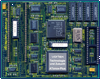
front side
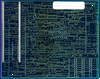
back side
- AToncePlus.pdf
User Manual
15.0 MB
- ATONCE-130.img
DOS utility disk v1.30
720 kB - AToncePlus-220.dms
system disk (german/deutsch) v2.20-10/91
275 kB - AToncePlus-300.dms
system disk (german/deutsch) v3.00-08/92
277 kB
Advert (DE)
1991-11
Advert (US)
1992-01
Advert (DE)
1992-04
Advert (US)
1992-05
Advert (US)
1992-12
Manufacturer Vortex Computersysteme, Germany | Date 1992 / 1993 / 1994 | Amiga A2000, A3000, A4000 | Interface Zorro II, ISA | Autoconfig ID 8215 / 7,8,9 |
- IBM AT emulation
- 80386SX @ 25 MHz or 80486SLC @ 25 MHz or 80486SLC2 @ 50 MHz (32 bit internal 16 bit external data bus, 1 kB cache inside, 2.4 times faster than 386SX)
- optional FPU
- optional HD/ED (1.2/1.44/2.88 MB) floppy disk controller kit (82077AA chip) for up to 3 drives (2 internal, 1 external)
- internal floppy connector and a DB25 port for external floppies (HD kit required)
- can use Amiga floppy drives as 360 or 720 kB
- DB9 connector for the optional Monitor Master switch
- built in IDE hard disk interface
- hard disks can be emulated either as Amiga partitions formatted to MSDOS or via hardfiles
- 27 different emulated video modes (from 4 color CGA to 2 color VGA or 8 color text only VGA)
- emulated video modes can be displayed in 15 kHz
- inserting an ISA display card automatically disables the video emulation
- 512 kB on board + four SIMM slots max 16 MB, 2 or 4 MB can be used by the Amiga
- 50% of Amiga RAM (this can be split between chip, fast, or public) can be used as RAM for the emulator
- built in realtime clock, speaker, CMOS RAM
- in server mode the Amiga can directly access the RAM and disk drives of the Golden Gate board
- the Amiga mouse is emulated as a serial Microsoft mouse
- the Amiga serial port can be used by the Golden Gate as either COM1 or COM2
- the Amiga parallel port can be used as LPT1 or LPT2 by the Golden Gate
- in A2000 an adapter is required under the 68000 (a simple capacitor is connected between two pins)
- in A3000 at least Buster rev. 07 is required
- jumper settings
| J1 | set | reserved |
| J4 | open | reserved |
| J5 | open | reserved |
| J8 | set | electronical speaker enabled |
| J8 | open | electronical speaker disabled |
| J2 | J3 | |
| open | open | Option ROM disabled |
| set | open | 2MB for Amiga |
| set | set | 4MB for Amiga |
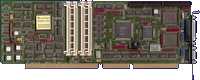
Golden Gate 386SX, front side
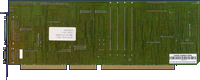
Golden Gate 386SX, back side
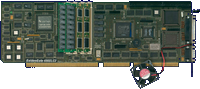
Golden Gate 486SLC2, front side
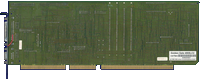
Golden Gate 486SLC2, back side
- GoldenGate486-13127.dms
Goldmine I install disk (Amiga side) v1.31.27-02/94
310 kB - GoldenGate486-12523.dms
Goldmine I install disk (Amiga side) v1.25.23-03/93
306 kB - GoldenGate486.zip
install disk (PC side)
36 kB
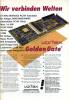
Advert (DE)
1992-10
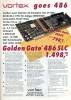
Advert (DE)
1992-11
Advert (US)
1992-12
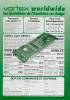
Advert (FR)
1992-12
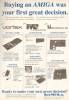
Advert (GB)
1993-02
Manufacturer Vortex Computersysteme, Germany | Date 1992 | Amiga A2000, A3000, A4000 | Interface RGB port |
- video switchbox
- automatic video switcher for Vortex GoldenGate 386SX and 486SLC bridgeboards
- switching is controlled by the GoldenGate through its DB9 connector
- when the GoldenGate screen is activated the VGA card output is displayed, when an Amiga screen is activated the RGB output is displayed
- external unit, connects between the monitor, Amiga RGB and GoldenGate VGA output
- three HD15 and three DB9 VGA connectors
Advert (US)
1992-12
Manufacturer Vortex Computersysteme, Germany | Date 1990 | Amiga A500 | Interface side expansion port |
- Memory Expansion
- external 4 MB FastRAM expansion for the A500 side expansion connector
- four 30 pin SIMM sockets accept 2 or 4 MB RAM
- supports 1 MB SIMMs, 100 ns or faster
- accepts SIMMs in pairs
- memory autoconfiguration
- passthrough connector for the side expansion port
- DB25 HDD connector - can be upgraded with a hard disk system unit to a System 2000
- Switch / Jumper Settings
| SW1 | ||
| 1 | OFF ON | Kickstart 1.2 Kickstart ≥1.3 |
| 2 | OFF ON | RAM enabled RAM disabled |
| 3 | OFF ON | HDD disabled HDD enabled |
| SW2 | ||
| 1 2 | ON OFF | 4 MB RAM (U6 - U9) |
| 1 2 | OFF ON | 2 MB RAM (U6, U7) |
| 1 2 | ON ON | 0 MB RAM |
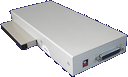
rear side
- Vortex_StorageSystems.pdf
Bedienungsanleitung / User Manual (german)
9.2 MB - Vortex_StorageSystems-en.pdf
User Manual
718 kB
Advert (DE)
1990-05
Manufacturer Vortex Computersysteme, Germany | Date 1988 | Amiga A500, A1000 | Interface side expansion port |
- ST-506 Controller
- the 3.5" hard disk is installed in an external case together with a 40W power supply and the XT controller card ('System Unit')
- all other components are placed in a small box ('Personality Module', PSM-S and PSM-NS) connected to the side expansion port
- the boxes are connected through their DB25 connectors
- PSM-NS:
- Personality Module for A500 and A1000
- no memory option
- for A1000, a U-shaped bracket needs to be attached at the bottom
- two DB25 connectors to attach a system unit, to allow the cable to be connected to the rear for A500 and A1000 - however, only one system unit may be connected
- PSM-S:
- Personality Module for A500 only
- memory option
- hard disk and memory disable switch (SW1)
- available stand-alone as memory expansion only (i.e., without System Unit): PSM-S
- uses DMA transfers
- autoboot ROM - autoboots even under Kickstart 1.2
- passthrough connector for the side expansion port
- Memory
- only available in PSM-S
- provides up to 4 MB FastRAM
- four 30 pin SIMM sockets accept 2 or 4 MB RAM
- supports 1 MB SIMMs, 100 ns or faster
- accepts SIMMs in pairs
- memory autoconfiguration
- Notes
- system unit needs to be powered on first, then the Amiga
- pressing left mouse button during startup disables hard drive
- Switch / Jumper Settings
| SW1 | ||
| 1 | OFF ON | Kickstart 1.2 Kickstart ≥1.3 |
| 2 | OFF ON | RAM enabled RAM disabled |
| 3 | OFF ON | HDD disabled HDD enabled |
| SW2 | ||
| 1 2 | ON OFF | 4 MB RAM (U6 - U9) |
| 1 2 | OFF ON | 2 MB RAM (U6, U7) |
| 1 2 | ON ON | 0 MB RAM |
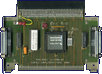
PSM-NS, Case opened, top side
PSM-S, rear side
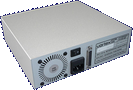
System Unit, rear side
- Vortex_StorageSystems.pdf
Bedienungsanleitung / User Manual (german)
9.2 MB - Vortex_StorageSystems-en.pdf
User Manual
718 kB
- System2000.dms
install disk
vortex.device v2.00 (5 Jan 1989)
277 kB - System2000-102.BIN
ROM Image v1.02 (10.05.1989)
32 kB - Vortex_HDInstall-103.dms
HDD Install disk
vortex.device v1.03
286 kB - Vortex_WB.dms
WB disk
356 kB
Advert (DE)
1989-02
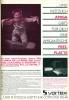
Advert (DE)
1989-05
Advert (DE)
1990-05