 Amiga Hardware Database
Manufacturer “Pangolin Laser Software”
2 expansions in database
Manufacturer Pangolin Laser Software, USA | Date 1991 | Amiga A2000, A3000, A4000 | Interface Zorro II |
- Laser Display Controller
- provides analogue and digital channels to control a Laser Display system (XYZ-RGB-I) to perform laser shows
- DB-25 connector on the slot bracket
- each analogue output provides bipolar direct current (DC)
- X, Y, Z channels: -5 to +5 volts
- R, G, B channels: 0 to +5 volts
- depth cueing input for 3D applications
- blanking support
- Software
- supported by Pangolin Laser Show Designer LD400 software package
- up to 16.800.000 colors
- up to 4 laser projector operated (requires multiple QM16 cards)
- 3D and 2D mode
- script-based programming to generate laser shows
- support for up to 32 tracks
- support for real-time 3D manipulations
- support for up to 10,000 3D laser frames with up to 2,000 points per frame
- renumbering laser graphics
- real-time laser preview
- Asteroids laser game
- Notes
- although intended as laser controller, the card and software can also be used for other DC control voltage applications
- no protection circuitry on the digital outputs
- DB-25 Connector Pinout
- note 1: all analogue grounds are tied together, as well as all digital grounds
- note 2: all analogue lines (pin 1 - 13) are protected by series resistor (100 Ohm), the digital lines (14 - 25) are directly connected to TTL chip
| Pin Number | Signal |
| 1 | X-axis output; +/- 5 volts (-left, +right) |
| 2 | Y-axis output; +/- 5 volts (-bottom, +tip) |
| 3 | Z-axis output; +/- 5 volts (-rear, +front) |
| 4 | Analogue ground |
| 5 | Analogue ground |
| 6 | Analogue ground |
| 7 | Not connected |
| 8 | Not connected |
| 9 | Depth cueing input (connects to pin 3) |
| 10 | Blue; 0-5 Volts (0V no colour, 5V Full colour) |
| 11 | Green; 0-5 Volts (0V no colour, 5V Full colour) |
| 12 | Red; 0-5 Volts (0V no colour, 5V Full colour) |
| 13 | Point Sample (+5V pulse each time a point is output) |
| 14 | Point status bit 7: 0V during track, 5V at end of track (last point) |
| 15 | Point status bit 6: 0V visible point, 5V blanked point (inverted blanking) |
| 16 | Point Status bit 5: 5V visible point, 0V blanked point (normal blanking) |
| 17 | Point Status bit 4: (reserved for future use) |
| 18 | Point Status bit 3: (reserved for future use) |
| 19 | Point Status bit 2: (reserved for future use) |
| 20 | Point Status bit 1: (reserved for future use) |
| 21 | Point Status bit 0: (reserved for future use) |
| 22 | Shutter control; 0V closed (no laser, 5V open (laser on) |
| 23 | Digital ground |
| 24 | Digital ground |
| 25 | Digital ground |
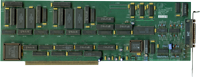
front side
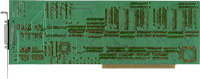
back side
Manufacturer Pangolin Laser Software, USA | Date 1989 | Amiga A2000, A3000 | Interface Paula socket |
- Laser Display Controller
- provides up to 4 channels to control a Laser Display system (XY-I or XYZ-I) to perform laser shows
- uses the 4 sound channels of the Amiga for controlling - as the Amiga provides only 2 stereo channels (mixed sound), the card is needed to have 4 independent channels
- 4× RCA connectors on the slot bracket
- each connector provides bipolar direct current (DC), -5 to +5 volts
- connector assignment (X, Y, Z, I) depends on the software and attached system
- board connects only to Paula socket via 48 pin connector attached to a ribbon cable
- Paula functions, like disk operations and the standard left and right audio outputs, are realized by the board, the chip is not needed any longer
- Software
- supported by Pangolin Laser Show Designer LD200 and LD300 software packages
- up to 256 colors
- 1 laser projector operated
- 3D and 2D mode
- script-based programming to generate laser shows
- support for up to 4 (LD200) resp. 8 (LD300) tracks
- Notes
- two clips (CEAC - black one, HIRAM - red one) have to be connected to 2 resistors on the board:
- A2000: CAEC to R409 (rear side), HIRAM to R407 (rear side)
- A3000: CAEC to R404 (right side), HIRAM to R405 (right side)
- although intended as laser controller, the card and software can also be used for other DC control voltage applications

front side

back side
- QuadMod8.pdf
A3000 installation instructions (english)
341 kB - a3000-qm8.htm
Pangolin
A3000 installation instructions (english)